October 30, 2026 · 5 min read · By GospelGen Team
How to clean a sermon transcript from SRT or VTT subtitles
Turn existing sermon subtitles into readable text. Follow a tested SRT example, choose cleanup options carefully and review the result before repurposing.
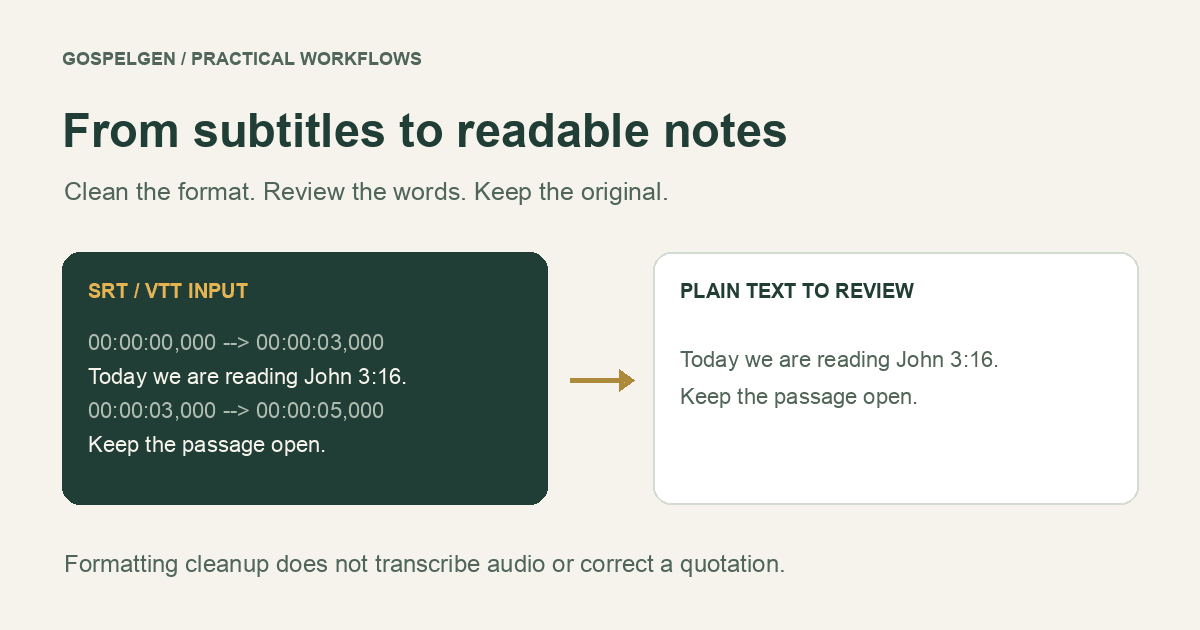
To turn sermon subtitles into readable text, start with a transcript you already have, choose its format and remove the subtitle timing information. Keep the original, review the words against the recording and only then use the text for a recap, study guide or newsletter. Formatting cleanup does not correct a transcription error.
Use the right starting file
A TXT file contains text. An SRT file normally has numbered subtitle cues and timestamps. A VTT file begins with WEBVTT and can contain timing, cue settings and other subtitle metadata. Choose the format that matches the actual contents; changing a filename extension does not convert a file.
GospelGen’s free transcript cleaner accepts pasted text or a UTF-8 TXT, SRT or VTT file, up to 1,000,000 UTF-8 bytes. Cleanup runs locally in the browser, without an AI call or automatic server saving. It requires no account. Save your result before leaving the page.
If you only have a YouTube link, use the transcript starting-point guide. The cleaner itself does not fetch captions, listen to audio or produce a new speech transcript.
An original subtitle example
This invented example is not a Bible quotation or an excerpt from a private sermon. Paste it into the cleaner, select SubRip subtitles (SRT), and leave both optional changes off:
1
00:00:00,000 --> 00:00:03,000
Today we are reading John 3:16.

2
00:00:03,000 --> 00:00:05,000
Keep the passage open.

3
00:00:05,000 --> 00:00:07,000
Keep the passage open.

4
00:00:07,000 --> 00:00:10,000
What does the surrounding paragraph say?
The default result is:
Today we are reading John 3:16.
Keep the passage open.
Keep the passage open.
What does the surrounding paragraph say?
The timing information and cue numbers are gone. Both copies of “Keep the passage open” remain. This example was checked in the public tool on 30 October 2026.
Choose optional changes deliberately
Joining lines makes one paragraph. It can be convenient for a short excerpt, but it removes line-based structure you might want to keep for editing. Start with the options off and keep an unchanged copy of the source.
Removing consecutive identical lines is narrower than rewriting or removing every repeated phrase. It removes adjacent lines that match exactly after subtitle cleanup. It does not reconcile every overlapping, progressively revealed caption. A phrase repeated later in the transcript is not automatically removed.
For the example, enabling both options produces:
Today we are reading John 3:16. Keep the passage open. What does the surrounding paragraph say?
That is a formatting choice, not proof that the speaker repeated a line by mistake. A preacher may deliberately repeat a sentence for emphasis. Check the recording before removing repetition from a resource attributed to the speaker.
Review the words after cleanup
A plain-text result can still contain a wrong name, number, Bible reference or missing “not.” Listen to any sentence that seems unclear and compare it with the recording. Mark uncertain wording for review instead of guessing.
Use the Bible-reference checking guide for a separate citation check. Reference bounds do not establish that quoted words match a translation or that a paragraph explains a passage correctly. Open the passage yourself and complete the quotation-and-context review.
A simple handoff checklist
- Keep the original subtitle or text file beside the cleaned copy.
- Check the selected format and input size if parsing fails.
- Start with line joining and duplicate removal off.
- Compare names, numbers, references and unclear statements with the recording.
- Preserve deliberate repetition and the speaker’s intended meaning.
- Remove confidential stories you do not have permission to share.
- Copy or download the complete cleaned text before leaving the page.
- Give the writer and reviewer a clearly named version and the source recording.
Use an excerpt for the next resource
Once reviewed, a short excerpt can support a recap, discussion questions or a newsletter invitation. The sermon repurposing workflow provides a reusable brief and review process. Its AI drafting step is separate from local transcript cleanup; only submit material you have permission to use.
Keep cleaning, proofreading and drafting as separate decisions. If your only task is converting a subtitle file to text, the free cleaner is sufficient. For a wider writing workflow, compare GospelGen and ChatGPT or GospelGen and Sermonary against the work your team actually needs.
Ready to put these ideas into practice? Start with GospelGen — free.
Try GospelGen Free →